
User-generated content (UGC) is anything your customers create about your products instead of you: reviews, photos, videos, questions and answers, social posts, contest entries. The 12 user-generated content examples below come from live brand sites we checked on October 4, 2026. They are sorted by type, and each one comes with the reason it works and the way to reproduce it on a Shopify store. If you only do one, start with product reviews that include photos: it is the UGC shoppers look for right before they buy.
The UGC that sells is the UGC that sits next to the Add to cart button: star ratings, review text, customer photos and answered questions. Hashtag galleries, contests and co-creation build the brand on top of that base. Collect it by asking every customer after delivery, ask for a photo in the same message, get permission before you reuse anything outside the review widget, and label content you rewarded.
Reviewed by Nicolas Provost, founder of Reviewz.ai. Insights based on auditing 500+ Shopify review setups and analyzing public pricing, schema, and conversion data across the leading review platforms. LinkedIn
What counts as user-generated content
UGC covers more than Instagram posts. For an online store, eight types matter.
| Type of UGC | Who creates it | Where it shows up | Example below |
|---|---|---|---|
| Ratings and written reviews | Buyers | Product page, collection page, Google results | Glossier, HexClad |
| Photo and video reviews | Buyers | Review widget, emails, ads | Dr. Squatch, Brooklinen |
| Questions and answers | Shoppers and buyers | Product page | Brooklinen |
| Reviews on third-party platforms | Buyers | Trustpilot, Google, the Shop app | Grind, Shop |
| Hashtag posts | Customers and fans | Instagram, TikTok, your own site | frank body, YETI, Cupshe |
| Community galleries | Members | A dedicated page | Sephora |
| Contest entries | Customers | Campaign page, social feeds | GoPro |
| Co-created products | Fans | The catalog itself | LEGO |
One clarification: a video you pay a creator to film in a "customer" style is a paid endorsement, not UGC, and it has to be disclosed as one. This article is about content real buyers make.
Why UGC works: what the data says
- Customer photos change the decision. In a PowerReviews survey of 15,870 US consumers (run in December 2023, methodology here), 91% said they are more likely to buy a product whose reviews include photos and videos on top of text. 23% will not buy at all when no previous customer has posted a photo or video, and that share reaches 36% among Gen Z.
- The first reviews matter most. The Spiegel Research Center at Northwestern University found that a product with five reviews is 270% more likely to be purchased than a product with none, and that the benefit of each extra review shrinks quickly after the first five. We go deeper on thresholds in how many reviews a product needs.
- People trust people. In Nielsen's 2021 Trust in Advertising study, 88% of respondents said they trust recommendations from people they know, more than any other channel. UGC is the closest thing a store has to that.
Review examples
1. Glossier: reviews that tell you who is talking
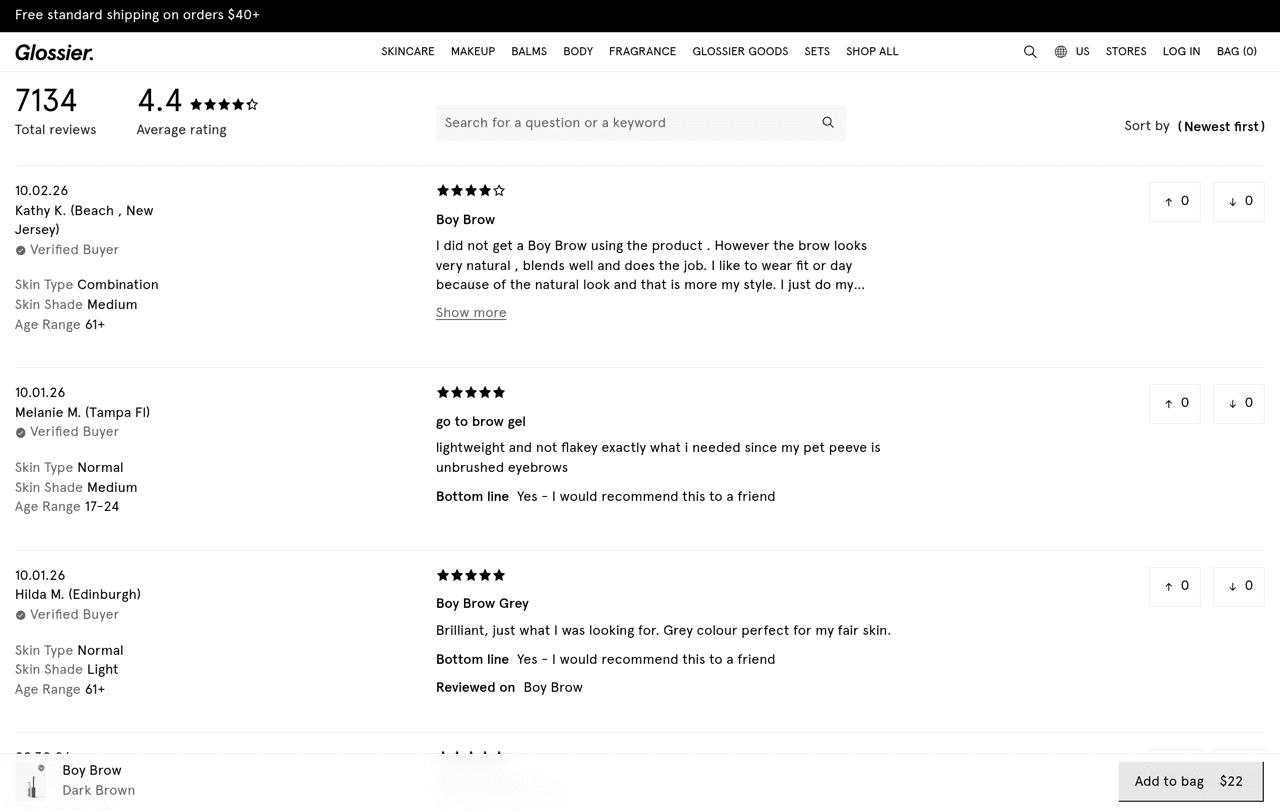
On the Boy Brow product page, Glossier shows 7,134 reviews with a 4.4 average. Reviews carry a Verified Buyer mark, the reviewer's skin type, skin shade and age range, a line saying whether they would recommend the product, and up and down votes.
Why it works: a review from someone like you is more convincing than a review from anyone. How to copy it: add two or three profile questions to your review form (size ordered and usual size for apparel, skin type for beauty, use case for equipment). Many Shopify review apps support custom questions.
2. Dr. Squatch: photo and video reviews, with a summary on top
The Pine Tar soap page lists 28,393 reviews, a 4.5 average, and the share of reviewers who would recommend the product (88%). Shoppers can filter the list to "Photos & Videos" only, filter by keyword (scent, texture, value), and read a short summary generated from the 100 most recent reviews before they scroll.
Why it works: nobody reads 28,000 reviews, so the page does the sorting. How to copy it: ask for a photo in the review request and switch on the media filter of your review widget.
3. Brooklinen: a media gallery, a Q&A tab and an honest label
Brooklinen's Luxe Sateen Core Sheet Set has more than 25,000 reviews. Above the list sits a "Reviews With Media" carousel of customer pictures, and a Q&A tab sits next to the Reviews tab. One detail is easy to miss: reviews written in exchange for something carry an "Incentivized review" label.
Why it works: the label makes every other review more believable. How to copy it: if you reward reviews, say so on each one. The rules are in our guide to offering a discount for reviews.
4. HexClad: one customer sentence on the homepage
HexClad's homepage has a banner with a count ("50,000+ 5-Star Reviews"), one short sentence from a customer signed with a first name and an initial, and a link to see all reviews.
How to copy it: pick the review that describes the result, not the product, and link the banner to the full list. Our product review examples show what a quotable review looks like.
Third-party review examples
5. Grind: Trustpilot reviews embedded on the store
Grind, a UK coffee brand running on Shopify, embeds Trustpilot widgets on its landing page, the same page that invites visitors to join its 250,000+ happy customers. The reviews are hosted on a platform the store cannot edit, which is the point.
How to copy it: collect reviews on a public profile, then embed that profile's widget. The setup is in our Trustpilot and Shopify integration guide.
6. The Shop app: UGC your store collects without a widget
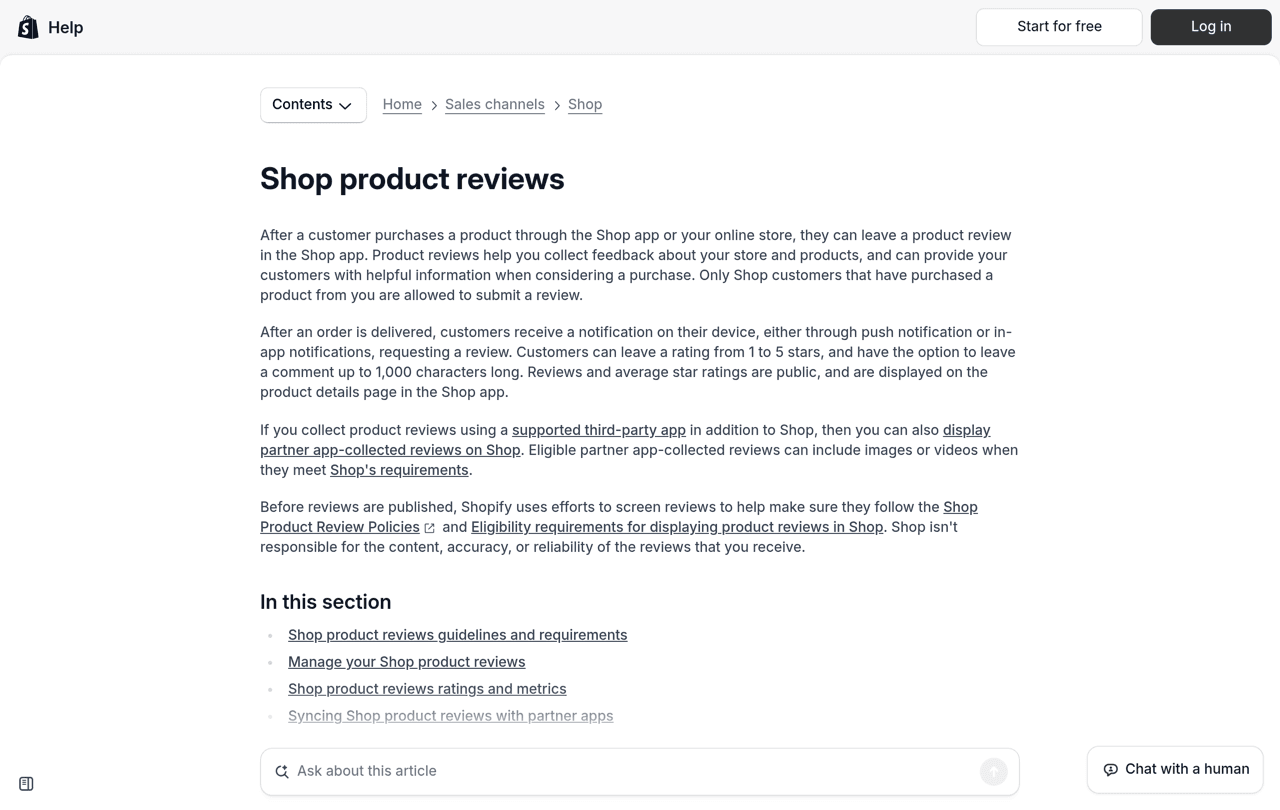
If your products are in Shopify's Shop app, buyers get a review request in the app after delivery. According to Shopify's documentation, only customers who purchased can review, the rating goes from 1 to 5 stars with a comment of up to 1,000 characters, and reviews collected by a supported review app can also be displayed in Shop, images and videos included, when they meet Shop's requirements.
Social and community examples
7. frank body: a branded hashtag on the homepage
The Australian body care brand (on Shopify) writes its hashtag, #thefrankeffect, directly on its homepage, next to the link to its social accounts.
How to copy it: choose one short hashtag nobody else uses, and print it where a customer looks after buying: order confirmation, packing slip, insert card.
8. YETI: a hashtag that states the brand promise
YETI's homepage invites visitors to see how people went further with gear tagged #BuiltForTheWild. The tag is a claim about the product, and every photo posted under it is evidence for that claim.
How to copy it: make the hashtag say what the product does, not only what the brand is called.
9. Cupshe: the community in the main menu
Swimwear brand Cupshe puts #CupsheCrew in its main navigation, at the same level as Dresses or Sale, and describes the section as real looks from its community. Customer photos are treated as a way to shop, not as decoration at the bottom of the page.
How to copy it: an Instagram feed or shoppable gallery app can build this page on Shopify. Link it from the menu once you have enough good photos to fill it.
10. Sephora: a gallery customers upload to
Sephora's Community Gallery lets members upload a photo or video, or mention the brand on social media, for a chance to be featured.
Why it works: the reward is visibility, which costs nothing.
11. GoPro Awards: contests with real prizes
GoPro Awards is a program of photo and video challenges. Customers submit photos, raw clips and edits shot on a GoPro, and selected entries earn social media features, gear or cash. One past challenge offered $5,000 for each of 16 winning ski and snowboard clips. The product is a camera, so every entry is a product demo.
How to copy it: a monthly "photo of the month" with store credit is enough, as long as entries are labeled as contest entries (see the rules below).
12. LEGO Ideas: customers design the product
On LEGO Ideas, fans submit set concepts. A concept that gathers 10,000 supporters is considered for production, and the fan designer receives 1% of the net sales of the set.
How to copy it: let customers vote on the next color, scent or flavor, and name the winner on the product page.
How to collect UGC on a Shopify store
These brands are large, but the mechanics are the same at 50 orders a month.
- Ask every customer for a review, after delivery. UGC does not appear on its own: you have to ask, at the moment the customer has used the product. Timing, wording and 17 templates are in our guide on how to ask customers for reviews.
- Ask for a photo in the same message. One line is enough: "A photo of it in use helps the next shopper more than anything." The request is often read on the same phone that took the picture. If you already talk to customers on WhatsApp through a tool such as Kanal, the photo request can go in the same thread.
- Add two or three profile questions to the review form, as Glossier does. Keep them optional.
- Put the ask in the parcel. Print your hashtag and a QR code that opens the review form on an insert card. The free review QR code generator builds the code.
- Display reviews where the decision happens: stars under the product title, the photo gallery above the review list, one quote on the homepage. If your theme has no review block yet, follow how to add reviews to Shopify.
- Reuse the best pieces elsewhere, with permission: post-purchase emails, product ads, the homepage. Our testimonial advertising examples show what that looks like in paid social.
Step 1 is the part Reviewz automates. It is a Shopify app that asks every customer for a review after an order over WhatsApp, SMS and email, sends customers who rate 4 or 5 stars to your public profile on Trustpilot, Google or Judge.me, and gives the others a private feedback form. It is free to start, and paid plans are on the pricing page.
Reviews are the UGC that sells. Ask every customer for one over WhatsApp, SMS and email, automatically.
Install Reviewz on ShopifyThe rules: permission, disclosure, no fakes
Permission. A customer's photo belongs to the customer. The US Copyright Office states that a work is protected from the moment it is created and fixed in a tangible form, and a phone photo qualifies. For a photo found under your hashtag, ask before you reuse it, and keep the answer:
Hi [First name], we love this photo. May we share it on our website and social accounts, with credit to you? Reply YES and we will take it from there.
Disclosure. If the customer received something for the content (a free product, a discount, a contest entry), readers must be told. The FTC's Endorsement Guides FAQ explains that a connection consumers would not expect, and that would affect how they judge the endorsement, has to be disclosed, and that for a contest, putting the word "contest" or "sweepstakes" in the hashtag should be enough. A hashtag made of your brand name alone is not.
No fakes. The FTC's rule on fake reviews and testimonials prohibits reviews from people who do not exist or did not use the product, AI-generated fake reviews included, as well as incentives conditioned on a particular opinion, positive or negative. We measured how well detection tools spot them in our AI review detection test.
Mistakes to avoid
- Hiding the gallery in the footer. UGC works next to the buy button.
- Showing only perfect reviews. The Spiegel research cited above found that purchase likelihood peaks between 4.0 and 4.7 stars and drops as the average approaches 5.0.
- Reposting without asking. Credit is polite, permission is required.
- Treating UGC as a social project only. Reviews are UGC too, and they are the kind that counts as social proof on the product page.
Related reading: Testimonial examples.
FAQ
What is an example of user-generated content?
A product review with a photo is the most common one. Others: a customer video, an answered question on a product page, a post under a brand hashtag, a contest entry (GoPro Awards) or a fan-designed product (LEGO Ideas).
What are the main types of UGC?
Ratings and written reviews, photo and video reviews, questions and answers, reviews on third-party platforms, hashtag posts, community galleries, contest entries and co-created products.
Is a customer review user-generated content?
Yes. It is created by a customer, not by the brand, and it is the UGC with the most direct effect on sales because it sits on the product page.
Do I need permission to repost a customer's photo?
Yes. The person who took the photo owns the copyright from the moment it exists. Ask in writing, keep the reply, and credit the customer.
How do I get user-generated content for a new store?
Ask every customer for a review 7 to 14 days after delivery, ask for a photo in the same message, and put a QR code to the review form in the parcel. The first five reviews per product matter most.
Is paid creator content the same as UGC?
No. A video you pay a creator to make is a sponsored endorsement, even when it is filmed in a customer style, and it has to be disclosed as such.

About the author
Nicolas Provost · Founder of Reviewz.ai
Nicolas built Reviewz.ai after auditing 500+ Shopify review setups while running Kanal (WhatsApp marketing for Shopify). He has spent four years inside the Shopify ecosystem and writes about review collection, brand trust SEO, and the actual economics of running customer-feedback flows on ecommerce sites.
