
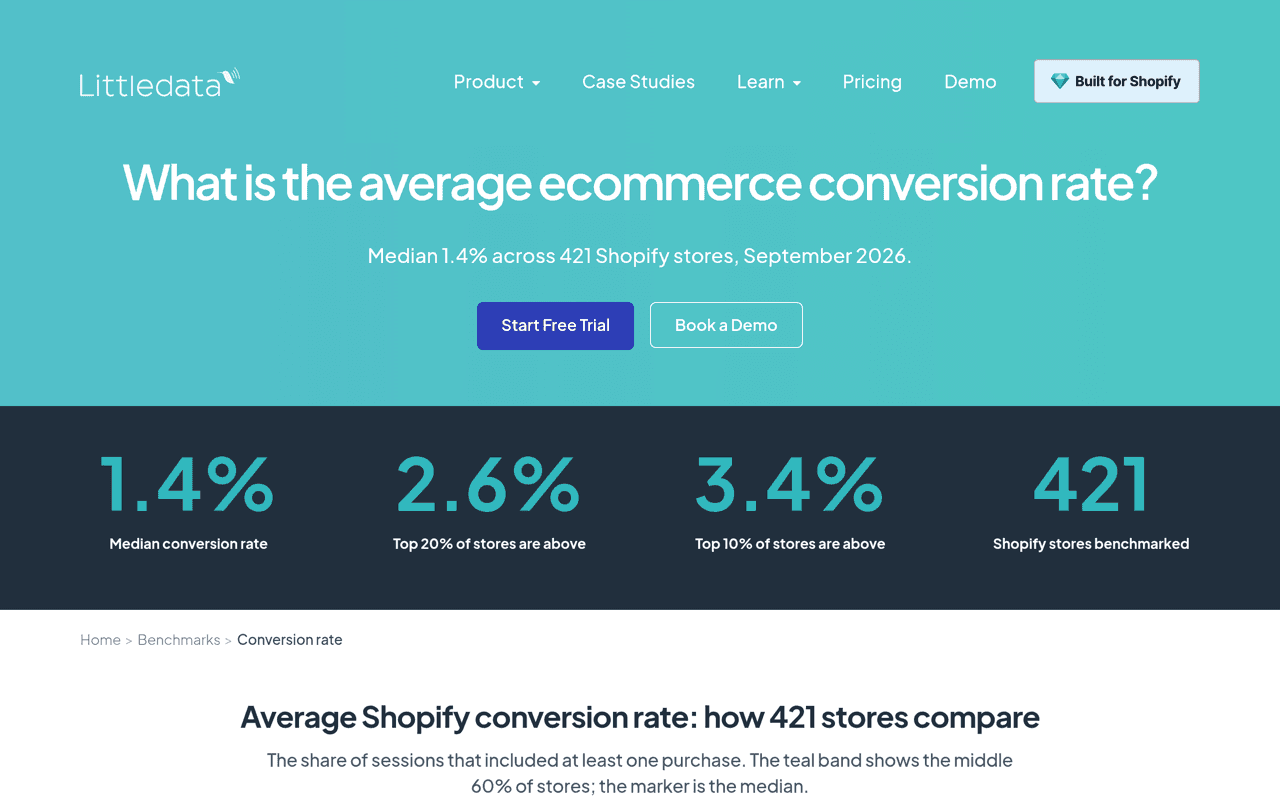
Shopify conversion rate optimization means raising the share of store sessions that end in an order. The median Shopify store converts about 1.4% of its sessions, and a store above 2.6% is in the top 20%, according to Littledata's September 2026 benchmark of 421 stores. To improve your own number, find the funnel step that leaks the most, then work in this order: checkout friction first, trust and reviews on the product page second, speed third.
A good Shopify conversion rate is above 2.6%. The median is 1.4%, and it varies a lot by industry (0.8% for home and furniture, 2.6% for beauty). Open the conversion report in Shopify Analytics, see where sessions drop, and fix the cheapest causes first: surprise costs, forced accounts, long forms and missing Shop Pay at checkout, then missing reviews on product pages, then slow mobile pages. Change one thing at a time and compare equal periods.
Reviewed by Nicolas Provost, founder of Reviewz.ai. Insights based on auditing 500+ Shopify review setups and analyzing public pricing, schema, and conversion data across the leading review platforms. LinkedIn
What is a good conversion rate on Shopify?
The most useful public benchmark is Littledata's conversion rate report, because it only covers Shopify stores. Its September 2026 edition measures the share of sessions that included at least one purchase across 421 stores.
| Segment | Bottom 20% | Median | Top 20% | Top 10% |
|---|---|---|---|---|
| All Shopify stores | 0.5% | 1.4% | 2.6% | 3.4% |
| Mobile sessions | 0.6% | 1.5% | 2.8% | 3.9% |
| Desktop sessions | 0.5% | 1.5% | 3.2% | 5.2% |
The average Shopify conversion rate hides large gaps between categories. In the same report:
| Industry | Median | Top 20% | Stores in sample |
|---|---|---|---|
| Beauty and skincare | 2.6% | 3.8% | 33 |
| Health and supplements | 2.5% | 4.0% | 33 |
| Fashion and apparel | 1.3% | 2.2% | 69 |
| Home and furniture | 0.8% | 1.8% | 54 |
Other sources give other numbers, because they measure other samples. Shopify's own article on ecommerce conversion rates cites Statista (1.4% of global ecommerce visits converted in the first quarter of 2026) and Dynamic Yield (2.66%), and says global averages tend to sit around 2% to 3%. The practical rule: compare yourself with stores in your category, and above all with your own last quarter.
How to find and read your conversion rate in Shopify
Shopify defines the online store conversion rate as the percentage of sessions that resulted in a purchase. To see it:
- From your Shopify admin, go to Analytics > Reports.
- Click the Category filter, choose Behavior, and open the Conversion rate over time report (the Conversion rate breakdown report sits in the same category).
- Read the four numbers it tracks: sessions, sessions with cart additions, sessions that reached checkout, and sessions that completed checkout.
These steps come from Shopify's behavior reports documentation. The four numbers form a funnel, and the step with the biggest drop tells you where to work.
| Where sessions drop | Likely cause | Fixes to try first |
|---|---|---|
| Few sessions add to cart | The product page does not convince: no proof, unclear offer | 7, 8, 9, 10 |
| Carts do not reach checkout | Costs or delivery terms discovered too late | 1, 6 |
| Checkouts are not completed | Friction or doubt at payment | 2, 3, 4, 5, 12 |
| Every step is weak on mobile only | Slow or awkward mobile pages | 11 |
A quick calculation shows what is at stake. At 10,000 sessions a month, a 1.4% rate means 140 orders. At 1.8%, the same traffic gives 180 orders: 40 more, with no extra ad spend.
Checkout fixes (1 to 6)
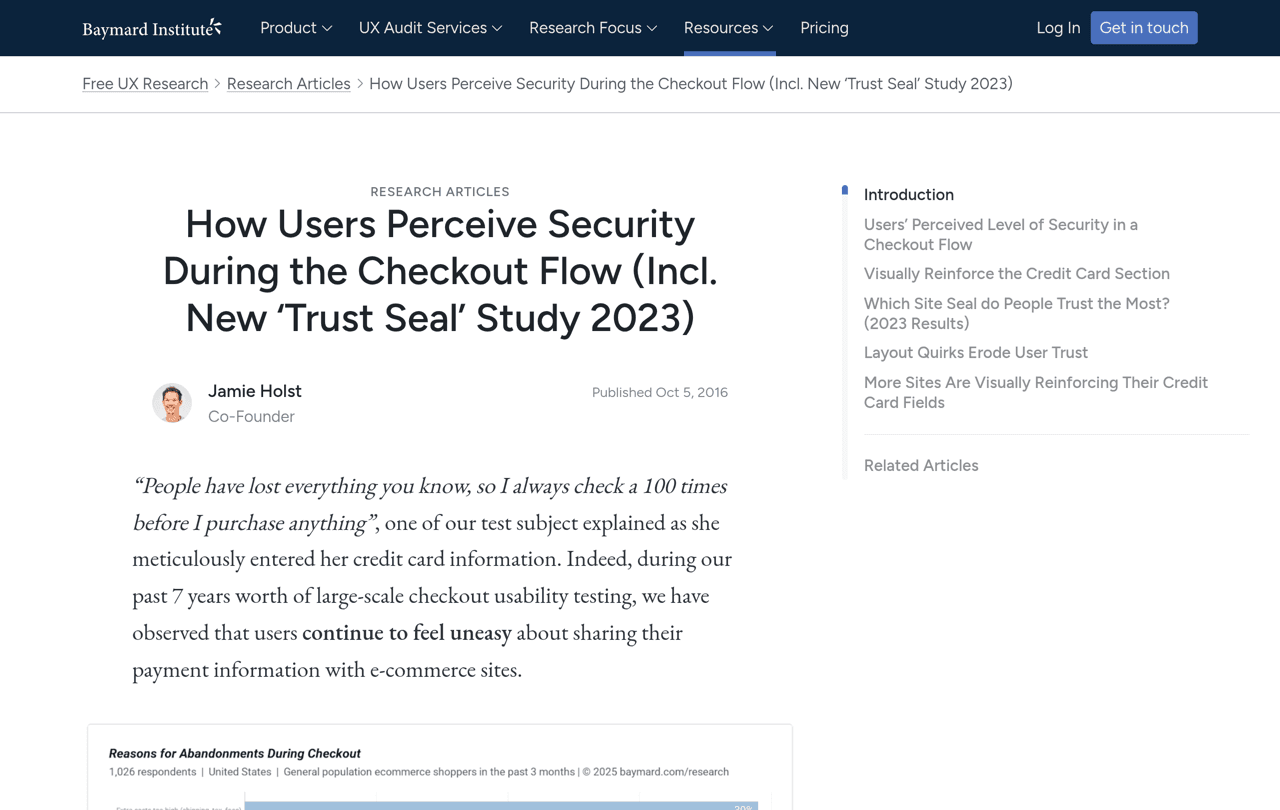
Start here, because checkout visitors already want the product. Baymard Institute puts the average documented cart abandonment rate at 70.22% across 50 studies, and estimates that a large ecommerce site can gain a 35.26% increase in conversion rate through better checkout design alone. Its survey of 1,026 US shoppers lists the main reasons people gave for abandoning, once those who were only browsing are set aside:
| Reason for abandoning the checkout | Share of shoppers |
|---|---|
| Extra costs too high (shipping, tax, fees) | 40% |
| Delivery was too slow | 20% |
| Did not trust the site with card information | 19% |
| The site wanted an account to be created | 18% |
| Checkout too long or complicated | 17% |
| Returns policy was not satisfactory | 13% |
| Could not see the total cost up front | 12% |
| Not enough payment methods | 9% |
Each of the first six fixes answers one line of that table.
1. Show the full cost before checkout. Surprise costs are the first reason on the list, and 12% more could not see the total up front. State your shipping rates and your free shipping threshold on the product page and in the cart, not only at the last step.
2. Let people buy without an account. In Settings > Checkout, make sure the option "Require customers to sign in to their account before checkout" is off. Shopify's checkout settings documentation adds a detail that many merchants miss: when that option is on, accelerated checkout buttons such as Apple Pay are not displayed in the cart.
3. Turn on Shop Pay. Shopify reports that Shop Pay converts as much as 50% better than guest checkout and that its presence alone lifts lower-funnel conversion by 5%, based on an external study run with a consulting firm in April 2023. These are Shopify's own figures, so read them as an upper bound, but switching it on takes a minute. It requires Shopify Payments: go to Settings > Payments, click Manage in the Shopify Payments section, check Shop Pay, then Save (Shopify's steps). More payment methods also answers the 9% who did not find theirs.
4. Remove the fields you do not need. In Settings > Checkout, the company name, the second address line and the shipping phone number can each be set to "Don't include", "Optional" or "Required". Unless your carrier needs a phone number, none of them should be required.
5. Make the payment step look safe. 19% of abandoners did not trust the site with their card. Baymard's research on perceived security in checkout shows that shoppers judge safety by what they see: card fields that are visually set apart, with a border, a background and a recognizable badge, feel more secure than the rest of the page. Which badges to use, and where, is covered in our guide to trust badges for Shopify.
6. Publish delivery times and the returns policy early. Slow delivery and unsatisfactory returns account for 20% and 13% of abandonments. Put a delivery estimate and a one-line returns summary next to the Add to cart button, and link the full policy.
Product page fixes (7 to 10)
If few sessions add to cart, the product page is not answering the shopper's question: will this work for me?
7. Get reviews on every product. The Spiegel Research Center at Northwestern University found that a product with five reviews is 270% more likely to be purchased than a product with none. Displaying reviews lifted conversion by 190% for lower-priced products and by 380% for higher-priced ones, which is why reviews matter even more on high-AOV stores. The benefit of each extra review shrinks after the first five, so spread your effort: five reviews on twenty products beat a hundred on one. See how many reviews a product needs, then how to add reviews to Shopify.
8. Add customer photos. In a PowerReviews survey of US consumers, 91% said they are more likely to buy a product whose reviews include photos and videos, and 23% will not buy when no previous customer has posted any. Real examples are in our user-generated content examples.
9. Put the proof above the fold. The star rating belongs under the product title, the review count on the product card, and one customer sentence near the price. Thirteen real examples are in our social proof examples.
10. Answer the objections on the page. Sizing, compatibility, what is in the box, how long it lasts. You do not have to guess them: ask recent buyers what almost stopped them, with one of the questions in our post-purchase survey guide.
Fix 7 is the one most stores never finish, because it depends on asking, order after order. This is what Reviewz does: the app asks every customer for a review after an order over WhatsApp, SMS and email, sends customers who rate 4 or 5 stars to your public profile on Trustpilot, Google or Judge.me, and gives the others a private feedback form. It is free to start, and paid plans are on the pricing page. The wording and timing of the request are in how to ask customers for reviews.
Reviews are the conversion fix that compounds. Ask every customer over WhatsApp, SMS and email, automatically.
Install Reviewz on ShopifySpeed and recovery fixes (11 and 12)
11. Speed up mobile pages. In Milliseconds Make Millions, a study commissioned by Google and conducted by 55 and Deloitte on 37 brand sites and more than 30 million sessions, a 0.1 second improvement in mobile site speed raised retail conversions by 8.4% and the amount spent by 9.2%. Shopify reports your Core Web Vitals in Analytics > Reports, and its web performance documentation gives the thresholds for a "good" score: a Largest Contentful Paint of 2.5 seconds or less, an Interaction to Next Paint of 200 milliseconds or less, and a Cumulative Layout Shift of 0.1 or less. The usual culprits are apps you no longer use and oversized images at the top of the page.
12. Recover abandoned checkouts. Shopify can email shoppers who left during checkout. Go to Apps > Messaging, click Automations, open the actions menu of "Abandoned checkout emails by Shopify", choose Edit settings, and enable "Send abandoned checkout emails automatically". The list itself is under Orders > Abandoned checkouts, and Shopify deletes entries older than three months (Shopify's guide). If your customers opted in to WhatsApp, a tool such as Kanal can send the same reminder there. What to send once the order is placed is in our post-purchase email flow.
How to test a change without fooling yourself
- One change at a time. If you rewrite the product page and enable Shop Pay in the same week, you will not know which one worked.
- Compare equal periods. Two to four full weeks against the same number of weeks before, with no sale in either.
- Watch the step you targeted. A checkout fix should move the share of checkouts completed, not only the global rate.
- Split by device and source. In the Littledata benchmark, the median is 1.5% on both mobile and desktop, but the top 10% reach 3.9% on mobile and 5.2% on desktop. A new ad campaign that brings colder traffic lowers your rate without anything being wrong with the store.
A 30-day plan
| Week | What to do | Fixes |
|---|---|---|
| 1 | Note your funnel numbers by device. Check the checkout settings: accounts, fields, Shop Pay. | 2, 3, 4 |
| 2 | Make costs, delivery times and returns visible before checkout. Review the payment step. | 1, 5, 6 |
| 3 | Start the review requests, add stars to product cards, rewrite the two weakest product pages. | 7, 8, 9, 10 |
| 4 | Run the speed report, remove unused apps, switch on checkout recovery, then measure again. | 11, 12 |
FAQ
What is a good conversion rate on Shopify?
Above 2.6%, which puts a store in the top 20% of the 421 Shopify stores in Littledata's September 2026 benchmark. The median is 1.4% and the top 10% reach 3.4% or more.
What is the average Shopify conversion rate?
The median is 1.4% of sessions. It varies by industry: 2.6% for beauty and skincare, 2.5% for health and supplements, 1.3% for fashion and apparel, 0.8% for home and furniture.
How does Shopify calculate conversion rate?
It is the percentage of online store sessions that resulted in a purchase. You find it in Analytics > Reports, in the Conversion rate over time report.
How do I increase my Shopify conversion rate?
Find the funnel step with the biggest drop, then fix checkout friction (surprise costs, forced accounts, long forms, no Shop Pay), add reviews and customer photos to product pages, and speed up mobile pages.
Why is my Shopify conversion rate so low?
The common causes are costs revealed at the last step, a checkout that requires an account, product pages without reviews, slow mobile pages, or new traffic that is less qualified than before.
Do reviews increase conversion rate?
Yes. Northwestern University's Spiegel Research Center found that a product with five reviews is 270% more likely to be purchased than a product with none.
How long does conversion rate optimization take to show results?
Checkout settings act immediately, but you need two to four full weeks of data to judge a change. Reviews build up over several weeks as orders are delivered.

About the author
Nicolas Provost · Founder of Reviewz.ai
Nicolas built Reviewz.ai after auditing 500+ Shopify review setups while running Kanal (WhatsApp marketing for Shopify). He has spent four years inside the Shopify ecosystem and writes about review collection, brand trust SEO, and the actual economics of running customer-feedback flows on ecommerce sites.
